



Получить бесплатные образцы
Последние новости
- ▶ Плоский настенный пескоуловитель
- ▶ Конденсаторный агрегат с воздушным охлаждением | холодильный агрегат HVAC ACCU
- ▶ Система компрессора природного газа Xinran прошла валидацию FAW Jiefang
- ▶ Рост экспорта высокомощных дизельных генераторов из Китая на 131.81%
- ▶ Высокоэффективные промышленные центробежные вентиляторы, малошумная воздуходувка для котельных дымососов
- ▶ Взрывозащищенный крышный вытяжной вентилятор из FFRP - материал FRP, высокая эффективность для промышленного использования
Сообщение
Installation Instructions for Side Wall Exhaust Fan
Время : Mar 28, 2026
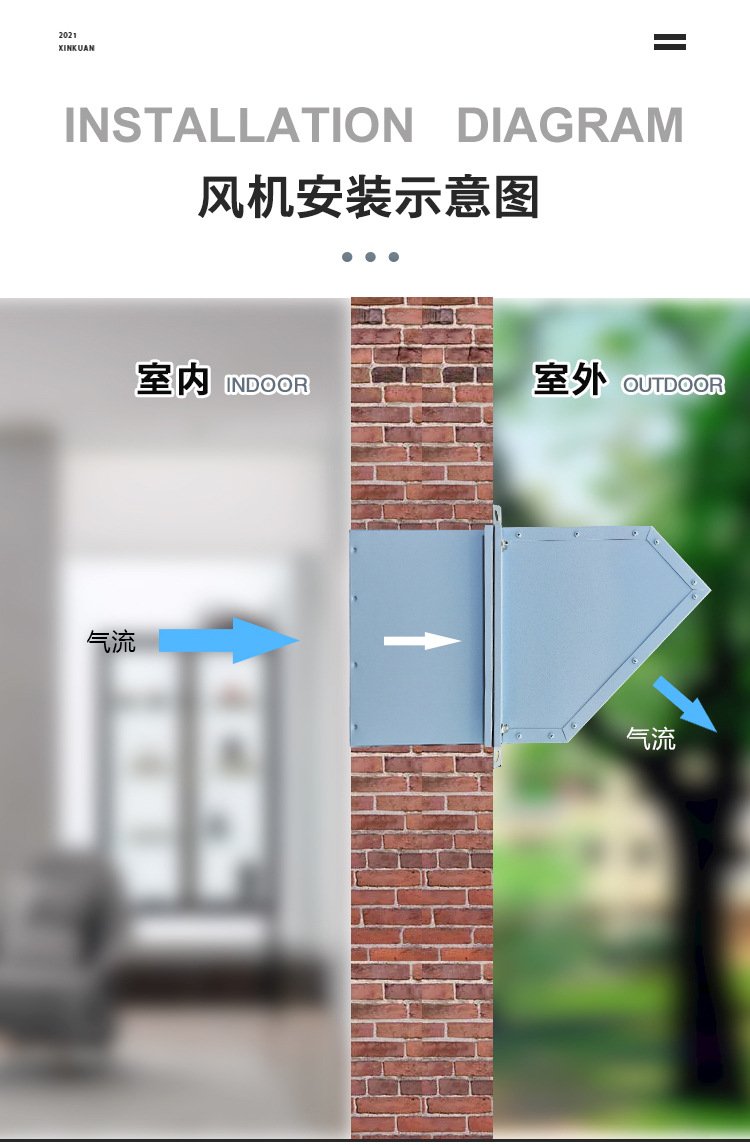
1. General Requirements
- The fan shall be installed on solid concrete walls, brick walls or light steel walls with sufficient load-bearing capacity to avoid vibration during operation.
- Keep the air inlet and outlet areas around the fan unobstructed; no obstacles shall be placed within 0.5 meters to ensure smooth air circulation.
- Ensure the installation position is horizontal and vertical (using a level gauge for inspection) to prevent abnormal noise and vibration caused by inclination.
- For explosion-proof models, the installation shall comply with the relevant regulations of hazardous areas, and the grounding shall be reliable.
- The installation shall be carried out by professional electricians and installers who have received relevant training.
2. Tools and Parts Preparation
2.1 Installation Tools
- Level gauge (digital or bubble type)
- Electric drill (matching the diameter of expansion bolts)
- Wrench set (socket wrench and open-end wrench)
- Screwdriver (cross and flat head)
- Tape measure, marker pen
- Sealant gun, waterproof sealant
2.2 Installation Parts
- Side wall exhaust fan body (complete with motor)
- Mounting frame (matching the fan model)
- Expansion bolts / anchor bolts (according to the wall material)
- Rain hood (45° or 90°, as per order requirements)
- Insect screen
- Gravity-type non-return damper (optional, if ordered)
- Waterproof sealing strip, insulating tape
3. Step-by-Step Installation (with Image Demonstration)
Step 1: Mark and Drill Mounting Holes
1. Determine the installation position according to the on-site ventilation needs, and ensure the wall at the position is intact and free of cracks.
2. Place the mounting frame against the wall, adjust it to the horizontal and vertical position, and mark the positions of the mounting holes on the wall with a marker pen.
3. Select an electric drill with a drill bit matching the diameter of the expansion bolts, and drill holes vertically at the marked positions. The depth of the holes shall be 5-10mm longer than the length of the expansion bolt sleeves.
Image Demonstration 1: Positioning the mounting frame on the wall and marking drilling points. (Note: The image shall show the installer holding the mounting frame against the wall, using a marker to mark the hole positions, with a level gauge placed on the frame to check alignment.)
Step 2: Fix the Mounting Frame
1. Clean the dust and debris in the drilled holes to ensure the expansion bolts can be installed firmly.
2. Insert the expansion bolts into the holes, place the mounting frame over the bolts, and put on the washers and nuts.
3. Tighten the nuts evenly with a wrench, and use a level gauge to recheck the horizontal and vertical alignment of the mounting frame. Adjust if there is any inclination until it is completely level.
Image Demonstration 2: Fixing the mounting frame with expansion bolts. (Note: The image shall show the mounting frame fixed on the wall, with expansion bolts installed, and the installer using a wrench to tighten the nuts, with a level gauge on the frame.)
Step 3: Install the Fan Body
1. Lift the fan body carefully (with the help of a helper if necessary) and place it into the fixed mounting frame.
2. Align the connecting holes of the fan body with the holes on the mounting frame, insert the connecting screws, and tighten them evenly with a screwdriver. Ensure the fan body is fixed tightly without shaking.
3. Check the gap between the fan body and the mounting frame; if there is any looseness, re-tighten the screws.
Image Demonstration 3: Installing the fan body into the mounting frame. (Note: The image shall show the fan body placed in the mounting frame, with the installer tightening the connecting screws, and the fan body aligned horizontally.)
Step 4: Install Rain Hood and Insect Screen
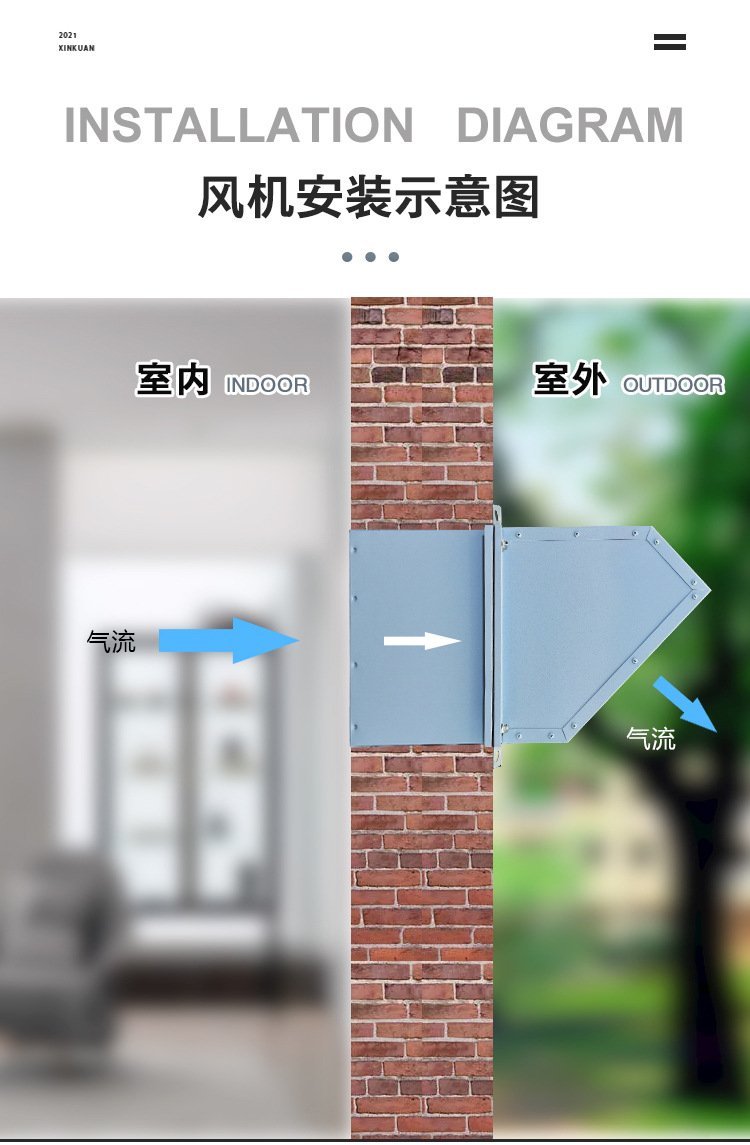
1. Install the rain hood on the outdoor side of the fan. Align the mounting holes of the rain hood with the holes on the fan casing, and fix them with screws.
2. Ensure the rain hood is installed tightly, with no gaps, to prevent rainwater from entering the room. For 45° rain hoods (exhaust type) or 90° rain hoods (supply air type), install them according to the fan function.
3. Install the insect screen on the outer side of the rain hood, fix it with screws, and ensure it covers the entire air outlet to prevent insects, leaves and other debris from entering the fan.
Image Demonstration 4: Installing the rain hood and insect screen. (Note: The image shall show the rain hood installed on the outdoor side of the fan, with the insect screen fixed outside the rain hood, clearly showing the structure of the rain hood and insect screen.)
Step 5: Install Optional Non-Return Damper
1. If a gravity-type non-return damper is ordered, install it between the fan body and the wall sleeve (if any).
2. Align the mounting holes of the damper with the fan and wall sleeve, fix them with screws, and check whether the damper can open and close freely without jamming.
3. Ensure the damper is installed in the correct direction (the opening direction shall be consistent with the air flow direction) to ensure effective isolation when the fan is not in operation.
Image Demonstration 5: Installing the gravity-type non-return damper. (Note: The image shall show the damper installed between the fan and the wall, with the damper blade in a closed state, and the installer checking the flexibility of the blade.)
Step 6: Wiring and Commissioning
1. Disconnect the power supply before wiring to ensure safety. Connect the power cable to the fan's terminal box according to the wiring diagram on the fan casing.
2. Ensure the wiring is correct (phase wire, neutral wire and ground wire shall not be connected incorrectly), and the grounding is reliable to prevent electric shock and equipment damage.
3. After wiring, turn on the power supply and run the fan for 5-10 minutes. Check the rotation direction of the fan (consistent with the direction marked on the fan casing), and listen for abnormal noise and vibration.
4. Check the air volume and air pressure to ensure they meet the design requirements. If there is any abnormality, shut down the power supply immediately and check the installation and wiring.
Image Demonstration 6: Wiring and fan test run. (Note: The image shall show the installer connecting the power cable to the terminal box, and the fan running normally, with no obvious vibration.)
Step 7: Waterproof Sealing
1. Apply waterproof sealant around the gap between the mounting frame and the wall with a sealant gun, ensuring the sealant is evenly applied and covers the entire gap.
2. For light steel walls or walls with uneven surfaces, install a waterproof sealing strip first, then apply sealant to enhance the waterproof effect.
3. Wait for the sealant to dry completely (according to the sealant instructions) before putting the fan into formal use.
Image Demonstration 7: Applying waterproof sealant. (Note: The image shall show the installer applying sealant around the fan perimeter with a sealant gun, with the sealant evenly distributed in the gap.)
4. Safety Notes
- Always disconnect the power supply before installation, maintenance or disassembly to avoid electric shock.
- Do not install the fan in a position where it may be hit by external objects, and do not block the air inlet or outlet during operation.
- All mounting bolts and connecting screws must be tightened firmly to prevent the fan from falling off during operation, which may cause safety accidents.
- For fans used in corrosive or explosive environments, ensure the model is suitable (corrosion-resistant or explosion-proof), and the installation complies with relevant industry standards.
- After installation, conduct a comprehensive inspection and test run. Do not put the fan into formal use until all indicators are normal.
- Regularly check the fan's fasteners, rain hood, insect screen and non-return damper, and maintain them in a timely manner if any damage or looseness is found.
5. Troubleshooting (Brief)
Предыдущая страница:Уже первый
Следующая страница:Уже последний
Оставить сообщение
Если вас заинтересовала наша продукция и вы хотите узнать больше подробностей, пожалуйста, оставьте здесь сообщение, мы ответим вам как можно скорее.